Mobile data
We look at local SIM and eSIM options for your destination, then check whether coverage suits the area around your stay.
Practical check: Confirm your phone can tether and set a data limit before a long call day.
Remote work planning from Ace Nomad
A beautiful apartment with a kitchen stool for a desk is not a workspace. We check the details that decide whether your working week holds up: the desk, the connection, the backup and the routine.
This is for freelancers, consultants, developers, writers and online educators who need their work to travel well. Reliability is designed, not hoped for.
The working standard
01 / Workspace ergonomics
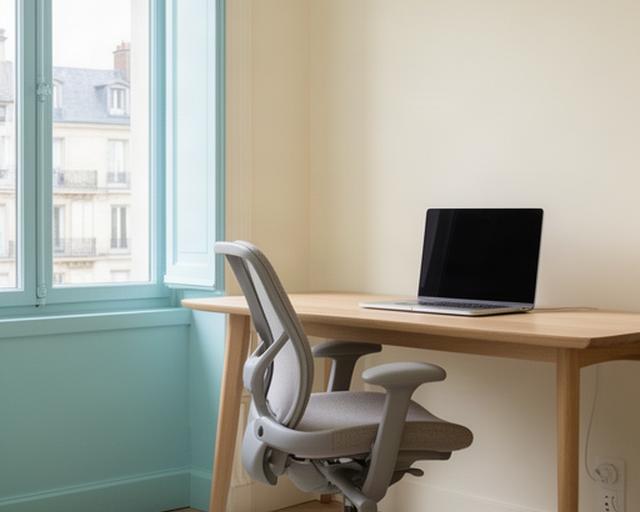
A dining table can look fine in a listing and feel wrong by the third morning. We assess the working position, not the styling.
We ask the host for a clear photo of the chair and whether its height adjusts. A dining chair with no back support may be fine for a meal; it is a poor bet for a long call block.
We check the desk dimensions, whether it is reserved for work, and if there is room for your laptop, notebook and any second screen you rely on.
Photos help us judge natural light and screen glare. We also check where the nearest socket sits, so charging does not depend on an extension lead across a walkway.
We ask about building work, shared walls and street activity at the hours you plan to work. A quiet-looking room in a photograph tells us very little.
02 / Broadband verification
“Fast Wi-Fi” in a listing is a claim, not a test. Older buildings, shared routers and evening demand can all change what reaches your desk.
We ask hosts for recent speed-test results, the time they were taken, the router location and whether the connection is shared with other flats. Where possible, we request an evening reading as well as a quiet-hour result.
Answers are assessed against your workload. Video calls, large file transfers and browser-based work put different demands on a connection.
Illustrative comparison
Illustration only, not a property test result. We document the evidence, note when it was collected and record a pass or fail with the reason.
03 / Backup connectivity
Your main connection is only one part of the plan. We pair it with a practical alternative before you need one.
We look at local SIM and eSIM options for your destination, then check whether coverage suits the area around your stay.
Practical check: Confirm your phone can tether and set a data limit before a long call day.
We identify a nearby coworking space or library and check its location, opening hours and suitability for calls.
Practical check: Save the route and opening times with your travel notes, not in a last-minute search.
Your setup review notes what to try if the router fails, where to move and how to keep a meeting or deadline on track.
Practical check: Test tethering once before departure and pack a charged power bank for calls.
04 / Coworking and coliving
A monthly pass is useful only if it fits your working pattern. We check the details before you pay for a desk you may barely use.
Worth considering when your accommodation cannot guarantee quiet, you have frequent calls, or you need meeting rooms and a desk outside the home.
Before committing, check call booths, room booking rules, opening hours and whether there is a desk available on the days you need it.
Verdict: pay for access when it solves a real working problem.
Shared houses can make it easier to meet people, but a lively kitchen and shared work table may not suit a call-heavy week.
Ask how many people share the space, whether there is a bookable quiet room and what the house rules say about noise.
Verdict: choose community with a clear plan for quiet work.
| Solo freelancer | Prioritise a private desk and keep a nearby coworking option for calls or a change of scene. |
|---|---|
| Working couple | Check for two separate work positions, enough sockets and a quiet arrangement when both have meetings. |
| Small team | Confirm room capacity, dependable video-call space and whether everyone can work at the same time. |
05 / Portable technology
A useful travel kit starts with what you do each day. We ask about calls, screens, software and weight limits before suggesting what to carry.
Power deserves a check. We review destination plug standards and device voltage requirements, then flag the right adaptor or converter for your kit.
A travel router may help if you work across several properties. For one stable base, it may be another item to pack without much benefit.
Protect sound quality and keep your connection stable through long meeting blocks.
We weigh the value of a second screen against the length of the stay and your luggage allowance.
Keep the essentials with you and source or rent equipment that is easy to find at the destination.
06 / Productivity and routine
A new place can loosen the edges of your working day. A simple routine keeps client work steady while leaving room to explore after hours.
Set a start and finish. Choose working hours that fit your clients and local time, then protect the end of the day.
Give work a defined place. A desk, a coworking seat or a quiet room helps keep calls and focused tasks out of the rest of the stay.
Review the week once. Check deadlines, connectivity and upcoming travel days before small disruptions become missed commitments.
A little structure leaves more room for the rest of the day.